Shared inbox
Urgent work looks like every other message.
- Hold sits beside routine mail
- Context stays in the thread
- Someone has to dig before acting

Flagship platform · AutonomeX
An execution layer between communication and the systems that run the business
InboxOS reconstructs the business situation behind incoming communication and turns it into structured, prioritised work. You choose which low-risk workflows auto-queue; uncertain and high-impact work stays with people.
Fast enough for operators. Clear enough for review.
The product
Real views of the product. The screens below the product demo are the current product on fictional logistics records. A hosted demo on the same records is available by invitation.
Product demo · 2 min 20 s
One journey through the product, recorded on an earlier build, from an email arriving to a situation held for a person's decision. Its labels, pipeline strip and send step have since changed; sending is disabled in the offline demo. Request demo access to try it on fictional records, by invitation.


See what needs attention
Open requests are ordered by attention, with priority and risk from the pack. Shown here is the Autonomous-eligible lens, sorted by time left against ERT: requests the routing rules made eligible, with no action executed.
Open the work
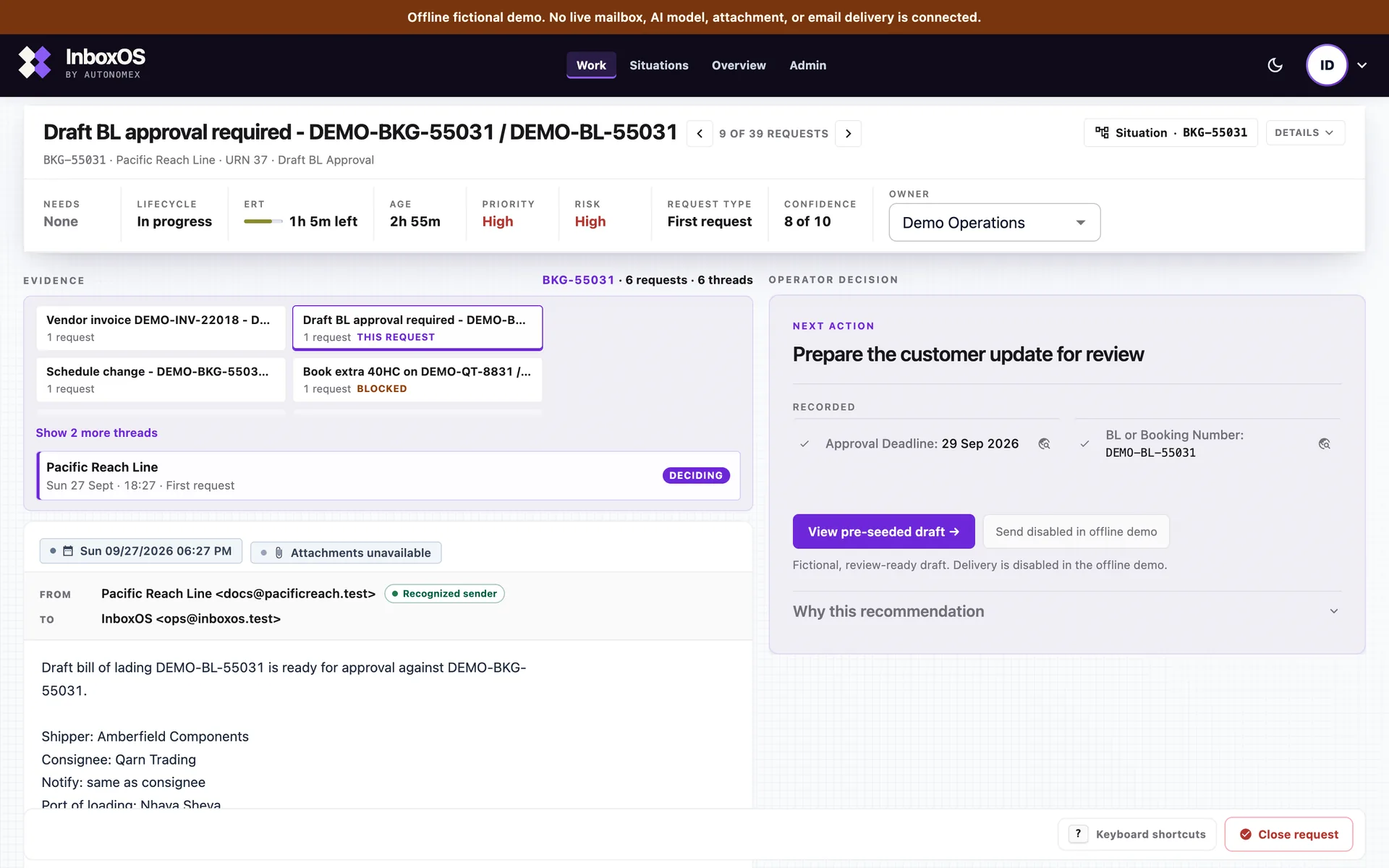
Evidence and the next action sit together. On this offline demo the draft is review-ready and send stays disabled. A person still decides what leaves.
Explain what happened
When operations, auditors or a handover asks why, the record is already there: each recorded stage and its note, and what was not recorded.

The idea
A chatbot helps a person answer email. InboxOS helps an organisation finish the work the email is about.
Email is the front door. Completed work is the product. That is controlled autonomy: you decide which workflows may advance automatically, while every external reply stays under your authority.
Before and after
The unit of work is the business situation, not the message. One operational exception, shown here on a logistics example: buried in the shared inbox before, raised as work with a draft waiting for a person after.
Operators start from what needs action and what is due; supervisors from overdue, blocked and unassigned work; leaders from exceptions and service position against ERT on Overview.
Urgent work looks like every other message.
The same hold rises as owned work.
Attention where it counts
InboxOS starts from the work a request actually is. The queue orders what needs a person. Situations group related requests. It does not file mail into Action, Awareness or Ignore.
Work
The work queue orders open requests by attention: blocked work, what is overdue against its expected resolution time, and what is waiting. Which fields matter is configured for the operation.
Situations
Requests that share a business reference can be read together. InboxOS does not keep a separate view that drops spam, promotions or duplicates out of the queue.
By role
Operational evidence
The same product read as an operating model: four unedited captures in the order work moves, each cropped to the part that matters, including where the product says it has no authority or did not record something.

Cropped for a small screen: the work involved, attention reasons and latest email for each situation.
What it is really about
Requests that share a booking reference are shown as one situation. This offline demo shows three. The view names the work involved, why it has attention, and what is blocked or overdue. InboxOS groups them in view; it does not persist a case object today.

Cropped for a small screen: the operator decision, including the next action.
What was understood
The operator decision for this offline-demo request: evidence on one side, the next action on the other. Send stays disabled here because the demo does not deliver mail. This frame is not a seven-stage record.
Cropped for a small screen: the three Autonomous-eligible requests, with their work types and time left against ERT.
What it may do
Requests eligible for the autonomous route under the configured decision rules. This offline demo states the boundary in the product: no action has been executed. Eligibility does not send a reply.
Cropped for a small screen: this request's full trace. It shows five authored stages and says authority passes to an operator.
What was recorded
This capture is one offline-demo request, not every request. It shows five authored stages, the last marked Awaiting review and human authority. The record says authority passes to an operator, and it lists what the pipeline did not record. The stages were written for the demo. A live run can record a different number.
Where InboxOS sits
InboxOS has no shipped connector into a TMS, ERP or CRM: nothing has been read from or written to them. In the offline demo, sending is disabled; a drafted reply waits for a person.
Same core, different vocabulary: request types, the facts that matter and which workflows are in scope live in your industry pack, outside the operating core. Run another email-heavy operation? Tell us your inbox and we will say whether it fits now or later.
Expected Resolution Target
ERT is the expected resolution target configured for each request type: a decision aid, not a service level agreement unless you contract it as one. The instrument below is the one the product renders.
Booking amendment · resolution target 4h
Within ERT
Under half the configured resolution target has elapsed.
Time elapsed
Six colour bands across three operational states. Step through them, or read the whole ramp below.
Blocked is a different problem
When a required field or document is still missing, the work is blocked on missing information. That is not a clock problem, and chasing the customer harder does not resolve it. InboxOS separates the two so an operator can tell a deadline from a dependency.
Blocked is not late. When a required field or document is still missing, the work waits on information, not on the clock.
Eligibility is not action
2x ERT or more means elapsed time has reached twice the expected resolution target. Nothing is escalated: no reassignment, notification or send fires from the clock. The 2x mark is a presentation default, not a pack setting.
Nothing is escalated. 2x ERT or more is a clock reading. No reassignment, notification or send fires from it.
You decide what urgent means
The target comes from the request type in your industry pack, and required fields and priority are configured there too. Where one message carries several requests, the shortest active target is the one shown. Prioritisation is configurable and governed, never an opaque score you cannot question.
The target comes from your pack, not from us. Priority is configurable and governed, never an opaque score you cannot question.
What changes
Four outcomes on the desk, each one something you can see in the product.
Request type, missing information, risk and owner sit with each piece of work. Work that fits no configured request type stays visible for review instead of disappearing.
Exceptions, missing documents and time-critical requests rise first, showing who owns each one, or that nobody does yet, and the next action.
Extracted fields, the one still missing, the evidence behind them and a ready-to-review reply sit together, so judgment goes where it matters. When one message carries more than one ask, each ask stays visible as work.
Edit the draft; a person with authority sends. The record keeps each recorded stage and its note, and what was not recorded.
Discovery grounds the labour range in your sample. Service, risk and control outcomes are judged in pilot evidence, not a second invented score.
Not available today: verified-sender protection, stronger live-mailbox conversation continuity and a scheduled review loop for unclassified work. What is shipped and what is not
The hosted demo runs on fictional logistics records, by invitation. Request demo access
Why InboxOS
Others help you write faster. InboxOS helps the organisation complete the job the message represents, with your people still in charge.
AI email responders
Usual fit
Fast drafts from a prompt or a short summary of the thread.
InboxOS
Clear work: what the email is about, what is missing, how urgent it is, and a draft waiting for a person to approve.
Inbox AI assistants
Usual fit
Personal help inside the inbox you already use every day.
InboxOS
A work queue that sits beside your team's connected mailbox. Urgent exceptions rise as owned work with priority, risk and review state.
Shared inbox tools
Usual fit
Team sorting of conversations and who owns the reply.
InboxOS
The words your teams already use, the exceptions that are genuinely time-critical, and a path you can look back on when someone asks why.
Helpdesk tools
Usual fit
Support tickets sorted into a general‑purpose taxonomy.
InboxOS
Operational work sorted into the request types your industry pack defines, with a person approving every send.
Build-it-yourself automation
Usual fit
Connecting tools with rules someone has to build and keep running.
InboxOS
It already understands the operational work your industry pack describes, with people still in the path when commitment is made.
Buyer’s field guide
Use the category that matches the work you need to change. InboxOS is for operational email that must become owned, reviewable work.
| What matters | Shared inbox | Helpdesk | Chatbot / agent | InboxOS |
|---|---|---|---|---|
| Primary job | Assign conversations | Manage support tickets | Answer or draft | Finish operational work |
| Understands your operational work | Manual setup | General‑purpose taxonomy | Prompt dependent | Built into the workflow |
| Missing fields + risk | Team checks | Rules and forms | Varies by prompt | Surfaced with the ticket |
| Approval before send | Possible | Possible | Not the control plane | Required by design |
| Reconstructable path | Conversation history | Ticket history | Model transcript | Work + review trail |
One measurable slice
Use the calculator for released capacity only. The fuller return is the four outcomes above: operating visibility, exceptions first, judgment on the real decision and control you can show.
Expected on your inputs The middle of three planning cases. Released hours per month after automation and residual review, counting 55% of the theoretical time save as adopted. FTE = hours ÷ 160. Value = hours × 12 × your landed hourly cost, before platform fees.
-
~- FTE of capacity · - labour value
Conservative to upside: - h / month · - FTE · -
A labour proxy from your inputs: released capacity, not cash saved or headcount cut. Before platform fees. Indicative, evidence grade C until Discovery.
Trust
One organisation. One dedicated setup. The private demo stays separate and uses fictional offline records.
AI acts. Humans stay in control.
Questions buyers ask first
Deeper evaluator questions are answered on the Security & Control page: default thresholds, priority rules, audit trail, approval rights and certification posture.
No. In the current product, a person approves every reply that reaches a customer before it sends.
Yes. You set the autonomy dial. You choose which workflows are eligible and the confidence and risk thresholds. Routine low-risk work can auto-queue into the Autonomous Queue, where it stays visible and supervised; uncertain and high-impact work stays in human review.
Yes. Autonomous Queue is optional. It is controlled in your industry pack, where eligibility is decided per request type: under the default rule (confidence at least 7 and low request-type risk), a pack with no request type marked low risk leaves nothing for the queue to hold. Classification, extraction, drafting and human approval before send remain available.
No. One organisation, one dedicated setup. Your deployment is single-tenant and dedicated to your company.
No. You start with fictional records, then a past-mail sample. The hosted demo uses fictional offline records for invited people. Discovery uses a past-mail sample you choose, and your live password stays with you.
Start light, then grow on the same core. There is no hard cutover. Your industry pack carries how work is judged; as evidence builds, we refine it with you and open more workflow types without replacing InboxOS.
Where data stays
Configurable autonomy
Documents
Briefs for security and leadership reviewers, on request with your demo note. The Security Overview is shared under NDA.
From the founder
AI that writes is becoming common. Trusted action is still rare. InboxOS exists so operations teams can move faster without giving up the judgment that protects customers and the company.
Banking data · Enterprise controls. Banking, compliance and consulting shaped the insistence on approval boundaries, traceability and explainable operations.
Banking data
Large-scale customer and transaction work made one lesson clear: intelligence matters only when people can act on it responsibly.
Enterprise controls
Banking, compliance and consulting shaped the insistence on approval boundaries, traceability and explainable operations.
AI systems
InboxOS brings workflow intelligence, agent orchestration and human judgment together at the moment work moves.
Begin
Size the work on your own sample, prove one workflow with its autonomy and review boundaries, then grow the industry pack on the same core.
How you buy
This page and a private demo on fictional records.
Your data None. The demo uses fictional offline records.
A past-mail sample you choose plus your labour costs, with no hard cutover. You see what is really in the inbox and get a labour range and an operating case.
Your data Historical sample you choose. Live password stays with you.
Start Fit Check intakeOne type of work, locked for the trial. Review boundaries stay under your control.
Your data Real inbox you allow, after a safe test first.
Ongoing use when the team is ready. The industry pack grows with new request types and fields, without replacing InboxOS.
Your data Your own private setup we run for you.
Discovery sizes the labour range on your sample. Service, risk and control outcomes are judged in pilot evidence. Fees follow that conversation.
First step
No live inbox. No deck-first pitch. The hosted demo runs on fictional logistics records; tell us your operation if you work outside freight.
Hosted demo
A person reviews every request. We use your details only to send access and schedule a walkthrough. Typical reply: 1 business day.
Assumptions added from your estimate.
Thanks. A person will review your request and reply within 1 business day.
Or email the AutonomeX team directly.