AutonomeX is the company. InboxOS is the platform. Logistics and freight forwarding is the operation InboxOS is demonstrated on today.
Operations mail in.Freight work out.
Bookings and amendments, quote chases, status questions, documents, schedule changes, holds, invoice disputes and claims arrive as mail. InboxOS reconstructs what each message is about, checks it against the fields the request actually needs, and raises it as owned work with priority and risk attached. You choose which low-risk workflows auto-queue; uncertain and high-impact work stays with people.
Bookings. Documents. Holds. Exceptions. Claims. InboxOS turns fragmented freight communication into owned, prioritised work.
Fast enough for an operations desk. Clear enough for review.
IntakeMail + documents
UnderstandRequest family + fields
RoutedPriority + risk
ApprovedA person sends
The governed execution environment · logistics
Scattered shipment signals. One governed situation.
A customs hold rarely arrives as one message. Watch the rejected entry, the missing commercial invoice and the chase cross the boundary as one shipment situation, move through the stages InboxOS records, and stop where your team decides.
Static view
Fragmented shipment signals converge on one entry point, resolve into a single shipment situation, and move through recorded stages until a person decides.
◇ Drag to explore
What the animation shows: unresolved shipment signals, such as a customs hold, a rejected entry, a missing commercial invoice and an urgent chase, sit outside a governed boundary. They converge on a single entry point and cross it as one shipment situation, blocked on the missing entry detail and waiting on the sender. That situation moves through the decision stages InboxOS records and stops at human review required. InboxOS has no shipped connector into a TMS, ERP, WMS or CRM, and the scene says so.
The forwarding desk
Mail that decides whether cargo moves.
A forwarding or logistics operations desk works through requests that arrive as mail: shipment commitments, pricing, tracking questions, documents, exceptions, money and claims. The mix differs by operation, lane and customer base. What repeats is the shape of the problem.
01
A hold and a routine chase look identical
A customs or carrier hold, a last free day approaching, a draft bill of lading waiting for approval: each arrives beside promotions, duplicates and routine status questions. The inbox gives them all the same visual weight, and cost is invisible until someone opens the message.
Shared inboxBooking confirmationRoutineETA · RotterdamStatusCustoms hold · MAEU123HoldInvoice queryNoiseQuote · HamburgRoutineSame visual weight. Different cost.02
The reference, the route and the last reply live apart
Booking reference in one thread, the revised sailing in another, the document in an attachment nobody filed.
Judgment that belongs on cargo, carriers and customers goes into triage and re-keying instead.
SortTagCopyChasePeople as the switchboard
What actually arrives
Seven request families. Configured, not guessed.
The InboxOS logistics pack in our repository carries seven request families across seventeen request types. They are example categories of forwarding mail, drawn from how this work is usually organised. No operation is assumed to run all seven: your pack is reviewed with you, and families you do not handle stay out of it.
01 · Booking and shipment execution3 request types
Turning agreed pricing into a moving shipment
New booking request Cargo committed against a quote, so the booking has to be created. Pack-configured priority high, request risk high, and the required inputs are quote reference, origin, destination, equipment or pieces and cargo ready date.
Booking amendment or cancellation Dates, equipment count, parties or a full cancellation. Configured priority high, request risk high.
Pickup and delivery scheduling Arranging or changing a pickup or delivery appointment. Configured priority medium, request risk medium.
02 · Quote and rate requests2 request types
Spot pricing, and the chase on quotes already issued
Spot quote request Pricing for a shipment. Configured required inputs include origin, destination, mode, commodity, weight or volume and incoterm, so a missing incoterm is a visible gap rather than a guess.
Quote follow-up and revision Extending validity, revising scope or chasing an answer on a quote already sent. Configured priority medium, request risk medium.
03 · Shipment status and tracking2 request types
Where is my shipment, from both sides
Shipment status request A customer asks where cargo is or when it lands, identified by a reference. Configured priority medium, request risk low.
Carrier arrival notice A carrier, co-loader or terminal notifies arrival or a transit milestone. Configured priority high, request risk low, because it is time-bound without being risky to handle.
04 · Customs and documentation3 request types
The paperwork that clearance depends on
Shipping document submission Commercial invoice, packing list and the rest arriving for a shipment file. Configured priority high, request risk medium.
Customs information request A broker or customs party asks for the data needed to file or clear. Configured priority high, request risk high.
Draft bill of lading approval A draft circulated for review and approval. Configured priority high, request risk high, which is exactly the kind of work that should not move without a person.
05 · Exceptions and delays3 request types
When the plan breaks in transit
Schedule change notification Rollover, blank sailing, flight offload or a revised ETD or ETA. Configured required inputs are shipment reference, the new ETD or ETA and the reason. Priority high, request risk medium.
Customs or carrier hold A shipment stopped by an exam, a documentation hold or a carrier hold. Configured priority high, request risk high, because an exception like this costs money for every hour it stays unnoticed.
Demurrage and detention risk A container at risk of, or already accruing, demurrage or detention against a last free day. Configured priority high, request risk high.
06 · Invoicing and billing2 request types
Money moving in both directions
Invoice dispute A customer challenges a charge or an amount on an invoice already issued. Configured priority medium, request risk high, so the risk value and the priority value do not have to agree.
Vendor invoice received A carrier, trucker, terminal or agent invoice arriving to be checked and paid. Configured priority medium, request risk medium.
07 · Cargo claims2 request types
Loss, damage, and the long tail of a claim
New cargo claim A consignee or shipper reports loss or damage and puts the forwarder on notice. Configured priority high, request risk high.
Claim follow-up Any party chasing, or supplying material for, a claim already open. Configured priority medium, request risk medium.
These seven are what the logistics pack covers today, not a description of your desk. If a family above is not your work, it stays out of your pack. If your operation carries a family that is not listed, say so in a conversation and we will tell you honestly whether it is configurable now or later.
Where the judgment lives
The pack carries the freight knowledge.
InboxOS is one shared core. The industry pack holds how the work is judged, and for logistics that judgment is written down per request type rather than improvised per message. That is the difference between a tool that drafts and a tool that can be reviewed.
Required inputs, per request typeEach request type lists the fields the work cannot proceed without. A booking with no cargo ready date, or a quote with no incoterm, shows up as a visible gap instead of a confident reply built on a hole.
Priority, per request typePriority is a configured value on the request type, combined with the tone of the message. It is not a fresh opinion formed each time a similar message lands.
Request risk, per request typeRequest risk is configured too, and it is what your autonomy thresholds act on: which work may auto-queue, and which stays in human review whatever the model thinks.
Priority and risk are separate values on purpose. An invoice dispute is configured as medium priority and high risk; a carrier arrival notice is high priority and low risk. Collapsing the two is how automation starts sending things it should not.
The product
One request, opened as work.
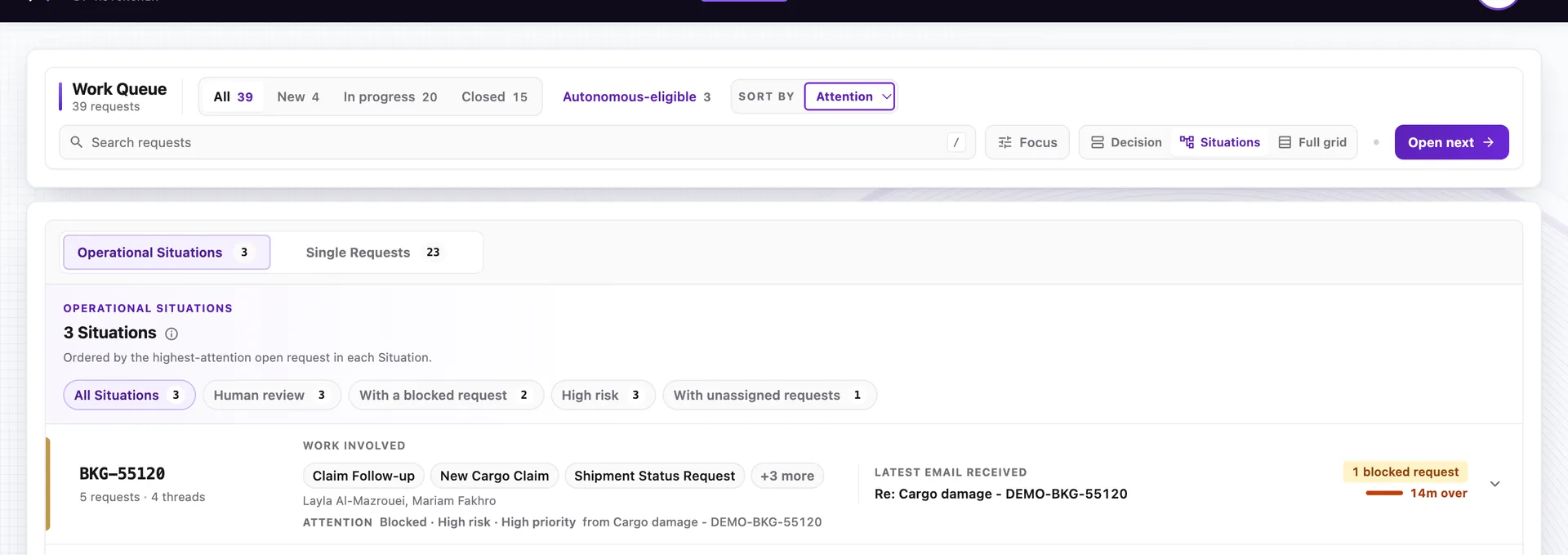
This is the current offline demo, running on fictional logistics records. The operator decision shown is a draft bill of lading approval: the evidence, the next action, and send held because this demo does not deliver mail. Human review still gates what would leave. There is no customer deployment behind this screen and no named customer anywhere on this page.
The current offline demo, on fictional logistics records: an operator decision for a draft bill of lading approval, with send held. No customer deployment behind this screen.
InboxOS · request detail Send needs approval
Current offline demo · fictional records shown
Request familyFrom the pack taxonomy
Fields and gapsAgainst required inputs
Priority and riskConfigured, then signalled
Draft for reviewEdit before anything sends
Multiple asksStay visible as work
Handling recordThe path you can look back on
Want to click it rather than read about it? Request demo access. It runs on the same fictional records, so nothing about it is a customer reference.
Fit with your stack
Works with the systems you already run.
Your TMS, ERP, WMS and CRM are where the shipment, the money and the customer record live. InboxOS is not a replacement for any of them. It sits between the conversation and those systems, and it is designed to complement them: the mail becomes structured, prioritised work that your people and your systems of record can act on.
The AutonomeX execution model · six governed stages
Mail comes in from customers, carriers, agents, brokers and truckers; prepared, reviewable work goes out, and your TMS, ERP, WMS and CRM stay the system of record. Between the two sits one execution model.
01UnderstandWhich request family it is
02ReasonWhat the shipment situation needs next
03GovernWhat your thresholds and risk allow
04ActPrepare or progress the work
05VerifyCheck the result before it counts
06TraceKeep the evidence of what happened
No rip and replace, and no connector claim on this page. Today InboxOS reads the operational mail, reconstructs the request and prepares reviewed work; committing that work into your systems of record stays with your team. Writing directly into those systems is product direction, not something we present as shipped. The honest boundary is set out in the security overview.
Built now. Built next.
The logistics boundary, visible.
Logistics is the operation InboxOS is demonstrated on today. That is a real, checkable status and it is not the same thing as a live customer deployment. We keep the difference on the page.
Demonstrated today·
The logistics pack is implemented and demonstrated
Seven request families and seventeen request types configured in the pack.
Required inputs, priority and request risk carried per request type.
Classification, extraction, priority and risk scoring, routing and a draft prepared for review.
Human approval before a reply reaches a customer.
A recorded handling path for operations, handovers and checks.
A hosted demo on fictional logistics records, by invitation.
Direction+
What we do not claim yet
No named customer and no production deployment is claimed on this page.
No shipped connector into a TMS, ERP, WMS or CRM.
No certification claim; security posture is answered contract by contract.
Validation against authoritative carrier or customs sources is direction, not shipped.
Wider workflow coverage grows with evidence, on the same core.
Human control
AI acts. Humans stay in control.
Those two sentences only hold together if the boundary is yours to set. You determine which logistics workflows are eligible for automation at all. Autonomy is bounded by workflow, by request risk and by your policy, and sensitive actions can remain subject to human approval however confident the system is.
Who decides what
You set the boundary. We keep it visible.
EligibilityYou choose which workflows may automate
BoundedBy workflow, request risk and policy
ApprovalSensitive actions can stay with a person
OutboundA person approves customer replies
ReversibleThresholds can be tightened at any time
RecordHandling history stays available for review
Configurable autonomy
How far each workflow may go is a setting.
Low riskStatus questions can auto-queue if you allow it
High riskDraft bill of lading approval stays in review
PriorityPack · tone
RiskPack request rules
SendUnder your authority
Trace · rolesA path you can show
The Autonomous Queue is optional and can be switched off where regional policy or your own preference requires every item to stay in human review. Classification, extraction, drafting and human approval before send remain available either way.
Ocean, air and road. The lanes your teams already run.
Container yards, uplift windows and the long haul on asphalt. InboxOS is built for the inbound mail that moves work across these modes.
Ocean
Air
Road
Scroll · the lanes open
Freight
Start a conversation
Bring one workflow. We will be honest about the fit.
A thirty minute conversation. No cutover, and no mailbox access to arrange first. Bring one request family your desk still handles by hand, from bookings to holds to claims, and we will walk through how InboxOS would treat it, where the fields would come from, what would stay in human review and what we cannot do yet.